In short
Capture each receipt at the moment you get it and tag it to the job it belongs to. The totals then add themselves up. All the effort sits in the capture, which takes a minute in the parking lot, and none of it sits in an evening of typing at the kitchen table.
In this guide
Ask most tradespeople where their job costs are recorded and the honest answer is: in a carrier bag, in the door pocket of the van, and in their head. The materials receipts, the fuel slips, the invoice from the sub, all real costs, all sitting as paper. Turning that paper into a clear answer to "did this job make money" is the job most people put off until their accounts are due, by which point half of it is faded or lost.
There is a better way, and it does not involve a spreadsheet or an evening of typing.
Why Receipts Are the Right Place to Start
Here is the thing almost every costing method misses: on a trade job, the receipt is the cost. You do not have to estimate what the materials came to, or try to remember how much fuel you burned driving to the supply house twice. The slip in your hand is the exact figure, dated, itemized, and proof for the IRS all at once.
That makes receipts the single most reliable source of truth you have. A spreadsheet holds what you remember to type. A receipt holds what actually happened. If you build your job costing around receipts instead of memory, the biggest source of error, the cost you forgot, disappears.
Why the Spreadsheet Method Breaks Down
Spreadsheets are not wrong, they are just fighting your working day. Three things go wrong in practice:
- It relies on memory. The costing is only as complete as what you type in, and the third parts run of the day rarely gets typed at all.
- It lives in the wrong place. The sheet is on a laptop at home. The costs happen in a supply house parking lot at 8am. By the time you are back at the laptop, the detail has gone.
- It never checks itself. A spreadsheet records your estimate and, if you are diligent, your actuals. It does not chase you for the receipt you did not enter.
The result is a sheet that is 80 percent complete and therefore misleading, because the missing 20 percent is exactly the costs that turn a good-looking job into a thin one.
The problem was never the math. It was that the costs happen in the van and the spreadsheet lives at home. Close that gap and job costing does itself.
The Receipt-First Method
The method is simple enough to describe in one line: capture every receipt the moment you get it, tag it to the job, and let the totals add themselves up. Here is how it works step by step.
1. Capture at the point of cost
The instant you take a receipt, in the supply house, at the pump, from your sub, you record it. Not at home, not on Sunday. The one moment you will never forget the cost is the moment you are holding the slip. A scan takes two seconds on the job.
2. Let the app read it
A good receipt scanner reads the total and the individual line items for you, so you are not typing figures. VanReceipts does this with AI-powered itemization, fast enough to read in the parking lot and built to handle faded, columnar thermal receipts. You confirm the read before it saves. We explain how that actually works in OCR receipt scanning, done right.
3. Tag it to the job
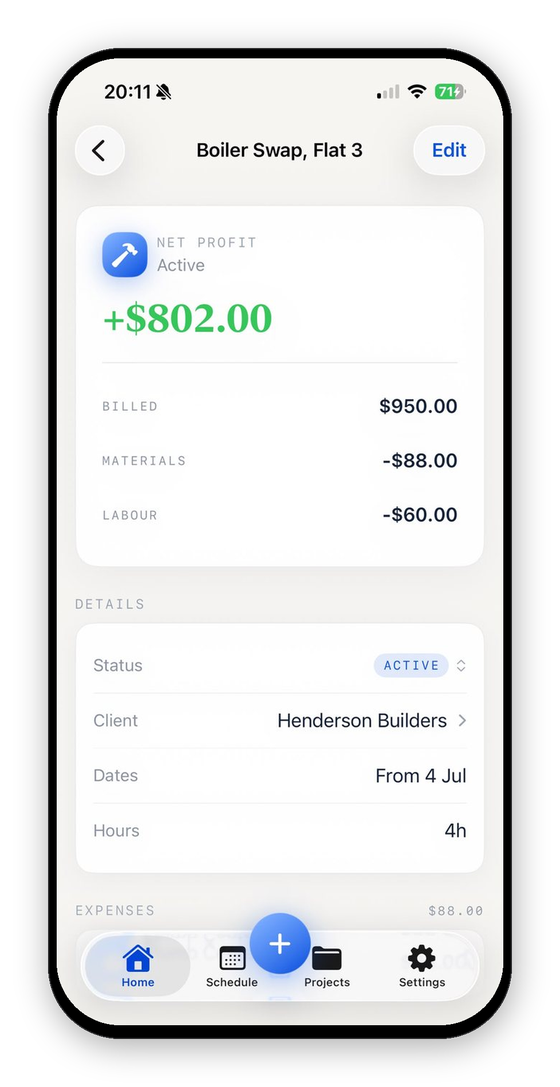
This is the step that turns a receipt into a job cost. You tell the app which job the receipt belongs to. In VanReceipts that is one pick from your open jobs, right after you confirm the read.
4. Add your labor
Materials are only half the story. Log your hours on the job at your hourly rate, and any subcontractor you paid, so the cost is the whole cost and not just the bits with a supply house slip. If you are not sure why your own time counts, the complete guide to job costing explains it.
5. Read the profit
With receipts tagged and labor logged, the profit on each job is already calculated. There is no month-end write-up, because the write-up happened two seconds at a time, all month.
What to Capture on Every Job
If you want the number to be right, these are the costs that need a receipt or an entry:
| Cost | Capture it as |
|---|---|
| Materials and parts | Scan the supply house receipt |
| Fuel and mileage | Scan the fuel receipt, or log the miles |
| Subcontractor or hired help | Scan their invoice, or log the payment |
| Parking, congestion, tolls | Scan or log on the spot |
| Consumables and small tools for the job | Scan the receipt |
| Your own hours | Log time at your hourly rate |
The rule of thumb: if it cost you money to do the job, it goes against the job. The small ones, the $6 parking, the extra bag of fixings, are the ones that quietly eat a margin, and they are exactly the ones a spreadsheet never captures.
Matching Receipts to the Right Job
The one genuinely fiddly part of receipt-based costing is deciding which job each receipt belongs to, especially when you have several running at once. This is where doing it in the van beats doing it at home. When you scan a receipt on the day, you still know exactly which job it was for, so picking the job takes a second. VanReceipts shows you an editable card with the read and the job before anything saves, so you are never guessing weeks later which slip went where.
Do it at month end from a bag of paper and you are reconstructing your movements from memory. Do it as you go and the match is obvious, because you are standing on the job.
Try It on Your Next Job
You do not need to reorganize your whole business to start. On your very next job, scan every receipt as you get it and log your hours at the end. When the job closes, you will have something you have probably never had before: an exact, itemized profit figure with every cost accounted for, and not a single evening spent typing.
Want to sanity-check the math first? The free job profit calculator lets you plug in a job's costs and see the margin in seconds, and the job costing spreadsheet template is there if you want to start on paper.
For the paperwork on the other side of the job, invoice vs receipt explains what to send a client and when.
Miles belong on the job too. The IRS mileage rate for self-employed contractors explains the rate and the log the IRS expects.
What did that job really make?Profit and margin for any job in seconds.FAQ
How do I track job costs without a spreadsheet?
Capture each receipt as you get it with a scanning app, tag it to the job, and log your labor hours. The totals add themselves up, so there is no spreadsheet to maintain and nothing to type up later.
How do receipts help with job costing?
A receipt is the exact, dated record of a cost. Building your job costing from receipts rather than memory removes the biggest source of error, the cost you forgot, because the slip captures what actually happened.
How does an app know which job a receipt belongs to?
VanReceipts shows an editable card with the read and the job you picked, so you can confirm or change it before it saves. Doing this on the day, in the van, makes the match far easier than reconstructing it weeks later.
Do I still need to keep the paper receipts?
Once a receipt is scanned and stored, the digital copy is your record, and it will not fade or get lost in the van. Check your own tax authority's rules, but a clear scanned copy is generally accepted for expenses.
What about costs with no receipt, like mileage?
Log them directly. Mileage, your own labor hours, and cash payments can all be entered as job costs even though there is no slip, so the total reflects the whole cost of the job.
Download VanReceipts on the App Store and turn your next pile of receipts into real profit per job.