In short
The test is not how well an app reads a receipt. It is whether the cost ends up attached to a job. Rewards scanners file it for points and corporate expense tools file it by category, and both leave you with a tidy pile you still cannot cost a job from.
In this guide
Search the App Store for a receipt scanner and the top results want to give you points for groceries. Search the web and you get corporate expense tools built for someone filing a report to their finance department. Neither is built for a tradesperson, whose question is not "how many points is this worth" or "which expense category does this go in," but "which job did this cost belong to, and did that job make money."
What Tradespeople Actually Need From a Receipt Scanner
A tradesperson does not scan a receipt to earn a reward. They scan it because it is a cost, and that cost belongs to a job. So the features that matter are different from what most scanner apps advertise:
- Read the total and the line items accurately, off a creased thermal receipt, in a van, in poor light.
- Attach the cost to a specific job, not just a date and a category.
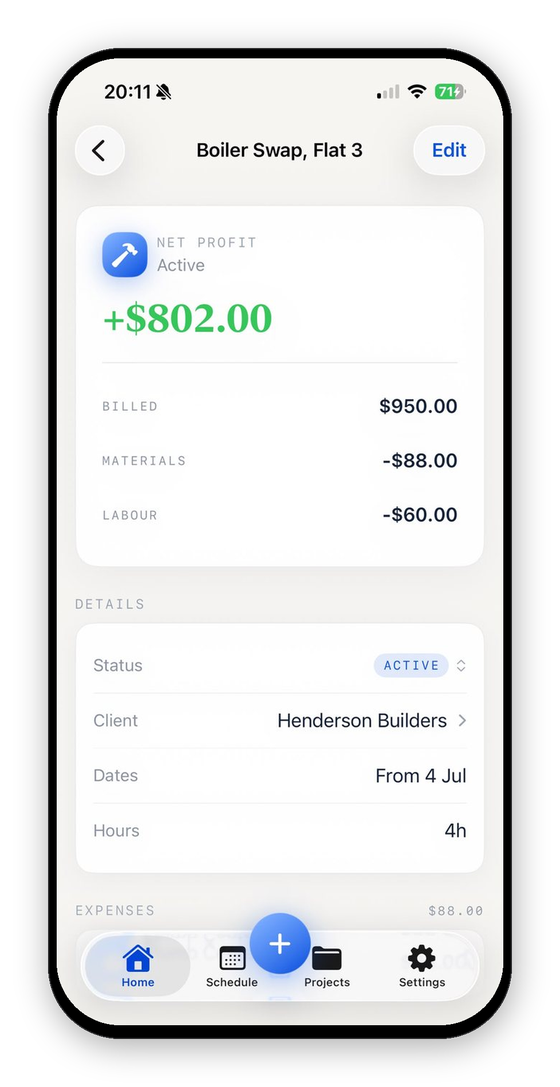
- Add up per-job profit, so scanning actually answers a business question.
- Keep the data private, because your suppliers and spending are your business.
Judge any receipt app against those four, and most of the popular ones fall away fast.
Why Rewards Apps Are the Wrong Tool
Apps like Fetch and Receipt Hog are popular, and for their purpose they are fine: scan a shopping receipt, earn points or coins, redeem them for gift cards or cash. But that purpose has nothing to do with running a trade. They do not track a job, they do not calculate profit, and they are built around consumer shopping receipts, not supply house and supplier slips. For a tradesperson they are a distraction: you spend effort scanning and get points, not the one number you needed, which is what the job made.
Why Generic Expense Scanners Miss the Job Layer
Tools like Expensify are a step up: SmartScan reads the merchant, date and amount off a receipt, and the app builds tidy expense reports. You can even tag an expense to a project, customer or job. But the product is built around the corporate model, an employee coding spending for a finance team to approve and reimburse. That is expense tracking, not job costing. A job tag tells you that $780 of materials went to a job; an expense report does not set that cost against the $3,000 you quoted and billed, add your hours, and show what the job made. The job layer, the thing that turns costs into per-job profit, is what a tradesperson still has to build somewhere else. That job layer is the whole point of tracking job costs from receipts.
What to Look For
If you want a scanner that actually helps your trade, look for these:
- Full itemization, not just a total. AI-powered reading pulls every line, not a lump sum, so you can see exactly which parts you bought, not just a lump sum. How that actually works is covered in OCR receipt scanning, done right.
- Job filing. Each receipt is filed to the job you pick, in a tap, before it counts.
- Per-job profit. It adds your costs and your labor into a profit figure for each job, which is the whole point.
Comparison
| Rewards apps (Fetch, Receipt Hog) | Generic expense (Expensify) | VanReceipts | |
|---|---|---|---|
| Built for | Shoppers earning points | Corporate expense reports | Tradespeople costing jobs |
| Reads receipt total | Yes | Yes | Yes |
| Line-item itemization | Reads products for points, not costs | Merchant, date and amount | Yes, cloud AI with Pro |
| Attaches cost to a job | No | Yes, as a tag | Yes, you pick the job |
| Per-job profit | No | No | Yes |
| Your own labor as a cost | No | No | Yes |
| Confirmed before it counts | No | You can edit after the scan | Yes, editable preview |
Competitor features checked on each company's own site, October 2026.
How VanReceipts Is Built for the Van
VanReceipts starts from the tradesperson's question, not the shopper's. You estimate and invoice from the job, scan a supply house or fuel receipt on the job, pick the job it belongs to, and log mileage on the same job. Log your hours at your rate, and profit updates on the spot. On the phone, the app reads the vendor, date and total, even with no signal; with VanReceipts Pro, cloud AI reads every line item, with unlimited scans. Nothing saves to the job until you confirm the read and pick the job. Pro is $14.99 a month or $99.99 a year, with a 3-day free trial on the yearly plan. It is the money app that answers the only question that pays your mortgage: did this job make money.
For the wider system, start with the complete guide to job costing and how to track job costs from receipts.
Receipts you keep and receipts you give are different documents. Invoice vs receipt covers which one a client needs, and what an invoice number is for covers keeping your own paperwork in order.
What did that job really make?Profit and margin for any job in seconds.FAQ
What is the best receipt scanner app for tradespeople?
The best one for a trade is not a rewards app or a generic expense scanner, but one that attaches each receipt to a job, supports invoices and mileage on that same job, and calculates per-job profit. VanReceipts is built for that: with Pro, cloud AI reads the whole receipt, every line item included, and you pick the job the receipt files to.
Can I use a rewards receipt app like Fetch for my business?
You can scan with it, but it will not help you run the business. Rewards apps give points, not job costs, so you still would not know which job a cost belonged to or whether that job made money. For a trade you want a job-costing scanner, not a points app.
What is wrong with using Expensify as a tradesperson?
Nothing, for expenses. Expensify codes costs by category and tag for expense reports, and you can tag a job, which is useful, but it is built for approval and reimbursement, not for showing the profit on a specific job. Tradespeople need costs set against what each job billed.
Do receipt scanner apps work on faded thermal receipts?
Reading quality varies a lot between apps. VanReceipts uses AI-powered itemization built to handle faded thermal slips and columnar line items, the two things that break basic OCR. With Pro it runs on every scan, unlimited, not as a separate opt-in step.
Try It on Your Next Receipt
The next time you take a receipt at the supply house, scan it into a tool built for your trade and tag it to the job. When the job closes, you will have a profit figure with every cost in it, not a pile of points and a vague sense that you were busy.
Download VanReceipts on the App Store and turn your receipts into per-job profit.