In short
Nine apps, what each one is genuinely good at, and where it fits in a one van stack. Most plumbers need three or four of them, not nine, and the expensive mistake is running two subscriptions that do the same job.
In this guide
- How to Choose Apps for Your Plumbing Business
- Best for Estimates, Invoices, Expenses, Mileage, and Job Profit
- Best Alternatives if You Already Quote or Bookkeep Elsewhere
- Best for Scheduling and Customer Management
- Best for Trade Calculations
- Best for Site Documentation
- Best Free Option
- What They Cost
- How to Combine Them
- FAQ
Most "best apps for plumbers" lists bury the money app or slot it into a vague finance category while rivals own estimating and invoicing. This list starts where the money lives. VanReceipts is built for plumbers who quote, invoice, snap supply house receipts, log mileage between service calls, and need to know what each job actually made. Everything else on this page is a supporting tool: a schedule, pipe math, site photos. Here are nine worth having, with the money app first.
How to Choose Apps for Your Plumbing Business
Three rules keep the stack sane:
- One app per job, not three. Overlapping tools mean double entry, and double entry means one of them is always stale.
- It has to work from the van. Plumbing costs happen at the supply house counter and on the driveway. A tool that assumes a desk will not survive your week.
- Cover the full money loop in one place. Estimate, do the work, invoice, capture parts and mileage, then see profit per job. Splitting that across three "finance" apps is how numbers go stale.
Best for Estimates, Invoices, Expenses, Mileage, and Job Profit
1. VanReceipts
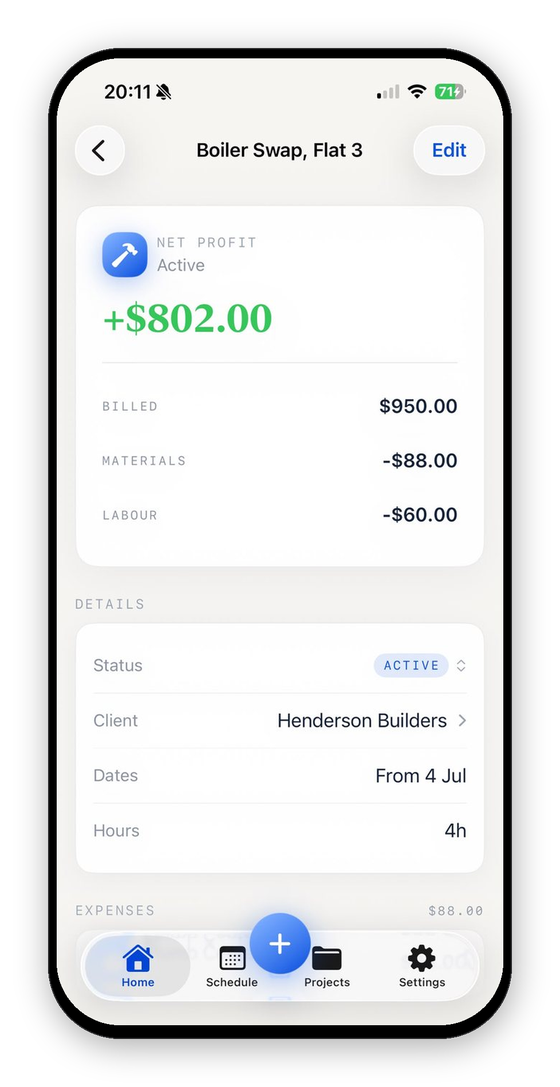
This is our app, so judge accordingly. VanReceipts is the plumber money app on this list: estimates and invoices tied to the job, expenses from a receipt scan in the van, mileage on the project, and live profit so you know what the water heater swap actually made you. Rivals on this page either price the work, schedule the week, or keep a calculator. None of them close the loop from quote to real cost in one place. The method is in how to track job costs from receipts, and the capture side in the receipt scanner built for tradespeople.
What that looks like on a plumbing job in 2026:
- Estimates and invoices from the same job. Draft an estimate from a voice note, a typed description or photos, check every price, and send it as a PDF by text or email. Turn it into an invoice in one tap, send a pay link (the client pays by card through your own Stripe account, and VanReceipts takes no cut), or record cash and check payments by hand. Balances stay on the job.
- It reads more than the total. AI-powered itemization reads every line with Pro, fittings, pipe, valves, so a supply run that covers three jobs splits across them instead of dumping on one. You pick the job and confirm the read before it saves, so a bad scan never becomes a bad number; the mechanics are in how VanReceipts actually reads a receipt.
- Sales tax kept separate. The tax on each parts receipt is stored as its own figure, with totals for any period, so you are not digging it back out at tax time.
- The miles between service calls. Pick From and To for the drive from the supply house to the emergency and the app works out the distance (or type it), and the trip attaches to the job you choose, which is worth real money at the IRS standard mileage rate.
- Your helper's hours count. Add your helper with their real hourly cost, put them on the job, and the profit figure reflects the labor, not just the parts.
- Export for the books. Export every job to Excel or CSV, or export a period from Accounting: income and expense files with a net profit summary, plus a mileage file. VanReceipts does not sync with QuickBooks or file taxes; the export is the hand-off.
- Private and synced. Your books live on your phone and in your own private iCloud, synced across your devices.
VanReceipts is an iPhone app. Free to make and send invoices and estimates. Pro is $14.99 a month or $99.99 a year, with a 3-day free trial on the yearly plan, and adds AI estimates, every template, quote and pay links, payments, receipts, mileage and job profit.
If you only install one business app from this list, make it this one. The rest fill gaps VanReceipts does not try to own.
Best Alternatives if You Already Quote or Bookkeep Elsewhere
2. Joist
Joist is strong if you already live in its estimate-to-invoice flow and want card payments on the spot. The quoting experience is fast and client-friendly. Plans on Joist's pricing page start at $12 a month for Basics (up to 5 documents a month), with Pro at $17 and Elite at $32, and a 14-day free trial. Its plans center on estimates, invoices and payments; it is not built around scanning supply house receipts line by line onto the water heater swap and showing live profit. If Joist already owns your quotes, keep it for that and use VanReceipts for costs and profit, or move the money loop into VanReceipts and drop the overlap.
3. QuickBooks Online
QuickBooks is the default when an accountant is doing your books. It is strong on invoices, bank feeds, and tax categories. QuickBooks pricing runs from a free plan (2 invoices a month) to Simple Start at $38 a month, and project profitability tracking starts on Plus at $140 a month, before any introductory discount. That job costing runs off bank feeds and categories you assign, which is a desk workflow, not a van one. If you want to try, here is how to set up job costing in QuickBooks; if that grind is not for you, here is where QuickBooks falls short for solo contractors. Keep QuickBooks for the year-end books. Use VanReceipts for what each job made you.
Best for Scheduling and Customer Management
4. Jobber
Scheduling, customer histories, quotes, and invoices in one platform. Suits a plumbing firm with a filled schedule and repeat customers. You adopt the whole system, which is its strength and its commitment. On Jobber's pricing page, Core is $49 a month month to month or $29 a month billed annually for one user, and job costing arrives on Grow at $199 a month ($149 billed annually). Reach for it when the schedule and dispatch are the pain, not when all you need is per-job profit from receipts.
5. Housecall Pro
Strong dispatch and booking for a service-call week: time slots, on-my-way texts, customer records. Basic is $79 a month, or $59 billed annually, for one user, and includes job costing; Essentials is $189 a month ($149 billed annually) for five users, per Housecall Pro's pricing page. Like Jobber, it wants to be the system you run everything in, so try one, not both. Pair it with VanReceipts if you still want receipt-level job cost after the schedule is sorted.
Best for Trade Calculations
6. Pipe Trades Pro
The pipe-trades calculator: rolling offsets, fitting angles, take-outs, slopes, pressure loss, the math you would otherwise do on a bit of board. Free to download, with full access at $4.99 a month or $39.99 a year on the App Store. A pocket staple for a reason.
7. Tradify
A job-management tool with a following among small trade businesses: quotes, jobs, scheduling, timesheets, invoices, and QuickBooks and Xero sync. Tradify's pricing page lists Lite at $47 per user a month, Pro at $51 and Plus at $61, with a 14-day free trial. A lighter-weight alternative to the big field-service platforms if you want structure without the full system.
Best for Site Documentation
8. CompanyCam
Timestamped photos organized by job. For a plumber, photographing the pipework before the floor goes down, or the pre-existing damage before you start, settles arguments before they begin. The app is free to download; the Core plan for one user is listed at $63 a month on CompanyCam's pricing page, with a free trial.
Best Free Option
9. Google Calendar (plus a free calculator)
A solo plumber not ready for a platform can run a perfectly good schedule on Google Calendar, which is free. Pair it with our free job profit calculator to sanity-check quotes and the job costing spreadsheet template to track costs manually until you automate it. When you are ready to stop typing totals, VanReceipts is the paid step that replaces the spreadsheet.
What They Cost
Prices checked October 2026 on each company's own pricing page or App Store listing. US prices, before tax and introductory offers.
| App | What it is for | Price |
|---|---|---|
| VanReceipts | Estimates, invoices, receipts, mileage, job profit | Pro $14.99/month or $99.99/year, 3-day free trial on the yearly plan |
| Joist | Estimates and invoices | Basics $12/month, Pro $17, Elite $32 |
| QuickBooks Online | Bookkeeping | Free plan (2 invoices a month), Simple Start $38/month, Plus $140/month |
| Jobber | Scheduling and field service | Core $49/month, or $29/month billed annually |
| Housecall Pro | Dispatch and field service | Basic $79/month, or $59/month billed annually |
| Pipe Trades Pro | Pipe math | Free download, full access $4.99/month or $39.99/year |
| Tradify | Job management | Lite $47 per user per month |
| CompanyCam | Job site photos | Core $63/month for one user |
| Google Calendar | Scheduling | Free |
How to Combine Them
| Role | Pick |
|---|---|
| Estimates, invoices, expenses, mileage, profit | VanReceipts |
| Year-end books (optional) | QuickBooks, if your accountant requires it |
| Schedule | Google Calendar, or Jobber/Housecall Pro/Tradify for the full platform |
| Trade math | Pipe Trades Pro |
| Site photos | CompanyCam |
For the money side of a plumbing business, VanReceipts: estimates, invoices, receipt expenses, mileage, and profit per job in one place. Add a calendar (or Jobber/Housecall Pro when the schedule outgrows it), plus Pipe Trades Pro for the math. You do not need a separate "finance" app and a separate estimating app if VanReceipts already covers both.
The full loop is explained in job costing for plumbers, and the electrical version, if you run mixed work, in best apps for electricians.
If you are weighing a full field service platform instead, the honest comparisons of Jobber, Housecall Pro and Joist show what each costs and who it suits. For pricing, see how to price plumbing jobs.
What did that job really make?Profit and margin for any job in seconds.FAQ
What is the best app for plumbers overall?
For the money side of a plumbing business, VanReceipts: estimates, invoices, receipt expenses, mileage, and profit per job in one place. Add a calendar (or Jobber/Housecall Pro when the schedule outgrows it), plus Pipe Trades Pro for the math.
What is the best free app for plumbers?
Google Calendar covers scheduling for a solo plumber at no cost, and free tools like a job profit calculator handle quote checks. Most estimating and field-service platforms are paid, though several offer trials. Free to make and send invoices and estimates. Pro ($14.99 a month, or $99.99 a year with a 3-day free trial on the yearly plan) adds AI estimates, quote and pay links, card payments through your own Stripe account, and unlimited receipt scans.
Which app tracks profit per job for plumbers?
VanReceipts is built for exactly that: scan each receipt from the van, pick the job and confirm, and with your hours and mileage logged it shows the real profit on every job. Estimating-only apps price the work but do not track what it actually cost.
Is Jobber or Housecall Pro better for a plumber?
Only when scheduling and customer volume genuinely outgrow a calendar. They are capable platforms, but a solo plumber with a manageable schedule can run leaner: a calendar plus VanReceipts for estimates, invoices, expenses, and profit.
Does VanReceipts handle mileage and sales tax, not just parts?
Yes. Alongside scanning materials receipts, it logs the miles between service calls (pick From and To and the app works out the distance), keeps the sales tax on each receipt as its own figure with totals for any period, and counts your helper's hours in the profit. Every job exports to CSV or Excel, and Accounting exports a period for your accountant. If any of the terms here are new, the job costing glossary and job cost accounting explained cover the basics.
Download VanReceipts on the App Store and see what your next job actually makes you.