In short
QuickBooks can do job costing through Projects or Classes, but the setup assumes an office and someone to keep it current. For a solo contractor the cost of keeping it accurate is higher than the answer is worth. The alternative is capturing each cost at the moment of purchase instead of reconstructing it from statements weeks later.
In this guide
You searched for QuickBooks job costing. You probably ended up in Intuit's help docs, confused, or on a forum thread where someone explained a workaround involving "Projects" or "Classes" and you thought: this cannot be the right answer.
It is not the right answer. Not for a solo tradesperson.
What QuickBooks Users Mean by Job Costing
Before the QuickBooks comparison, a clear definition: job costing is knowing exactly what a specific job cost you and what it earned you, so you can calculate the actual profit for that job.
Not profit for the month. Not total business revenue minus total expenses. Profit for this particular rewire, this bathroom remodel, this water heater swap.
That number matters because it is the only way to answer the question most tradespeople cannot: "Did I price this job right? Am I making money on this type of work, or am I losing it?"
Without per-job visibility, you are pricing by gut feel, billing by habit, and discovering pricing problems only when your bank account tells you something went wrong.
What QuickBooks Actually Does
QuickBooks was built for general bookkeeping, not for a tradesperson sitting in a van outside a supply house.
When you connect your bank account to QuickBooks, transactions import automatically (the Free plan connects one bank). QuickBooks then categorizes each transaction by expense type: materials, fuel, tools, subcontractors. That categorization powers two things: your profit and loss statement for the business as a whole, and your tax categories at year end.
Both of those are useful. Neither of them shows you profit per job.
QuickBooks sees a payment to Home Depot or a local supply house as an expense in the "materials" category. It does not know whether that purchase went into a kitchen remodel, a commercial rewire, or a rough-in on new construction. The job layer does not exist.
The Projects workaround in QuickBooks Online
QuickBooks Online (the cloud version) does have a feature called Projects, on the Plus plan ($140 a month at list price) and Advanced ($340 a month), per Intuit's pricing page, prices checked October 2026. Simple Start ($38) and Essentials ($85) do not list it, and neither does QuickBooks Solopreneur. You create a project for each job, then assign income and expenses to it. In theory, this gives you per-project profit.
In practice, for a tradesperson buying materials on the fly, it requires:
- Finding the receipt in your bank feed.
- Opening the Projects tab.
- Assigning the transaction to the right project.
- Repeating this for every purchase, every day.
That is the desktop version of the problem you are trying to solve. The discipline it demands is the same discipline that makes people quit spreadsheets. The data capture happens at a desk, after the fact, from a screen, not from the van after a supply run after a supply house run.
The forum threads on this topic are people asking each other how to make it work, because the official path does not fit the way tradespeople actually operate.
What Happens in Practice
Here is the typical pattern for a QuickBooks user in the trades.
A job starts well. The estimate goes out, the client says yes, work begins. The first few supply house runs get logged, more or less. By week three, receipts are in the glove box. By the end of the job, reconciling everything in QuickBooks feels like archaeology: pulling receipts from pockets, cross-referencing card statements, trying to remember which purchase went to which site.
The project still shows a profit number, but it is wrong because the manual entry process missed things. Materials that came from the van stock. A second trip to the supply house that nobody logged. Two hours of labor that got absorbed into "overhead."
The profit number looks healthy enough to justify not changing the pricing. Then another job runs over. And another.
This is the pattern that the "quickbooks costing" search is expressing. Not "how does this feature work." "Why is this not working for me."
What Solo Contractors Actually Need
The requirement is simple: capture the material cost at the moment it happens, put it on the right job while you still remember which one, and show a running profit number without a desk session.
That is it. No general ledger. No bank reconciliation. No year-end journal entry. Those things matter, and QuickBooks is the right tool for them. But the per-job profit question is a different problem, and it needs a different tool.
The pattern that works for tradespeople is one where the data capture takes a moment in a parking lot, not twenty minutes at a desk. Where pointing a phone at a receipt and picking the job is the entire workflow, done while you are still standing at the van.
How VanReceipts Fills the Gap
VanReceipts is not a QuickBooks replacement. It is the layer QuickBooks is missing.
It is an iPhone app for the money loop on a trade job: estimates and invoices, receipt expenses, mileage, and live profit per job. The receipt path is the fastest part: scan, confirm the job, and the cost is in.
The whole loop takes less time than putting on your seatbelt:
- Leaving the supply house, put the receipt on the dashboard and open VanReceipts.
- Scan it. Cloud AI reads the whole receipt, every line included. With no signal, the phone still reads the vendor, date and total.
- With Pro, cloud AI reads every line item, including faded thermal receipts.
- Check the read, pick the job it belongs to, and confirm. The cost lands on that job.
The job association is yours to make: the app does not guess it from your location or calendar. You pick the job from your list and confirm before anything saves. Doing it in the van, on the day, is what keeps it accurate.
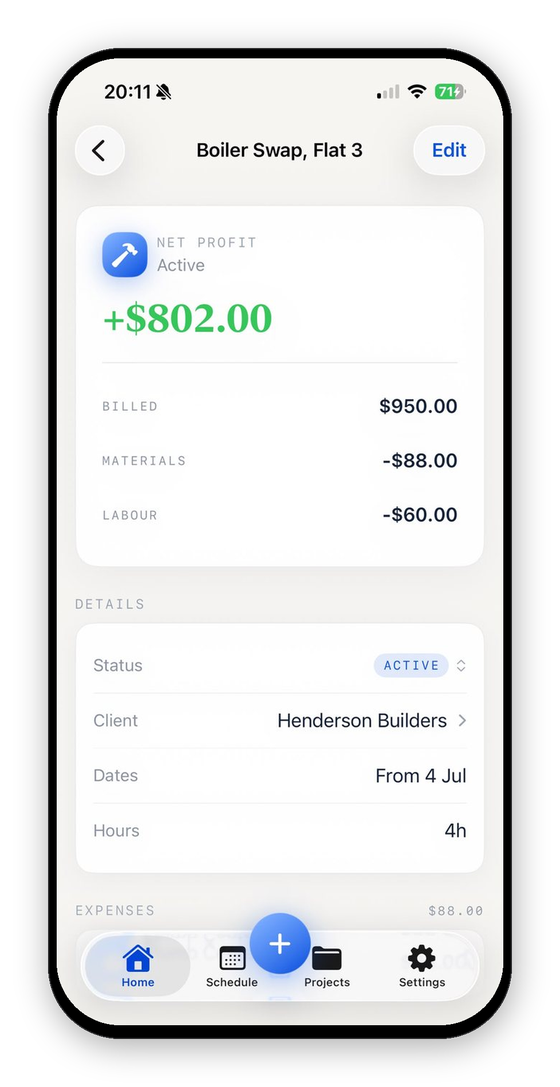
What you see after scanning is live job profit: the job name, what you have billed, materials and mileage spent, labor, and the current net. That number updates with every scan and trip. Mileage is simple: pick From and To and the app works out the distance, or type it. By the end of the job, you know exactly what it made you.
What VanReceipts does not do: it does not prepare your tax return, connect to your bank, reconcile your account, issue 1099s, sync with QuickBooks, or replace your accounting software. For all of that, QuickBooks remains the right tool. The two products solve different problems on different time horizons.
What did that job really make?Profit and margin for any job in seconds.A Note on the Numbers
There is a structural reason this gap exists, and it is not QuickBooks being careless. Tax reporting categorizes income and expense by type, not by job. "Materials for the Westbrook job" does not exist as a category on a Schedule C. "Materials" does.
This means your accounting software, whether QuickBooks, Xero, or Wave, will always work at the business level for tax purposes. Job-level P&L is a separate concern, best tracked in a separate tool that does not complicate your year-end records.
VanReceipts keeps costs per job on your phone and in your own private iCloud. At year end, export the period from Accounting (income and expense files with a net profit summary, plus a mileage file) and hand it to your accountant alongside your usual bank statements. The job-level breakdown is for your operational decisions, not for the return.
Comparison: QuickBooks Projects vs VanReceipts for Per-Job P&L
| Question | QuickBooks Projects | VanReceipts |
|---|---|---|
| Can I see profit per job? | Yes, once each transaction is assigned to a project | Yes, live, from the costs you file to each job |
| How does a cost reach the job? | You assign it to the project, often later from the bank feed | You pick the job when you scan, then confirm |
| Does it work in the van? | Mobile app, but the project tagging is usually desk work | Built for the phone: scan, pick the job, confirm |
| Are receipts read automatically? | Receipt capture reads a receipt and suggests a category | With Pro, cloud AI reads the whole receipt, every line included |
| Is my receipt data uploaded to a server? | Yes (cloud accounting) | Yes, to itemize it with cloud AI, disclosed in the privacy policy |
| Bank feed and reconciliation | Yes | No |
| Can I use it alongside QuickBooks? | N/A | Yes, hand off by CSV or Excel export (no sync) |
| Price | Projects needs Plus, $140/mo list, or Advanced, $340/mo (pricing) | Look around free with sample jobs, then Pro at $14.99/mo or $99.99/yr |
Prices checked October 2026 on the QuickBooks pricing page and the App Store. Intuit often discounts the first months.
The Right Mental Model
Think of QuickBooks and VanReceipts as covering two different moments in a job's life.
QuickBooks still owns the bank feed, tax categories, and year-end books. VanReceipts covers the job itself: estimates and invoices tied to the work, every supply-house receipt and mileage trip captured in the field, and live profit per job. Use both when your accountant needs QuickBooks; use VanReceipts alone when you mainly need honest job numbers.
The profit number QuickBooks eventually shows you is built from data you entered at a desk. The profit number VanReceipts shows you is built from receipts, mileage, and hours you logged as you worked. The difference is whether the number is there before the weekend or after.
Look Around Before You Pay
Free to make and send invoices and estimates. VanReceipts lets you look around free with sample jobs, then Pro (3-day free trial on the yearly plan) adds AI estimates, card payments, scanning and your real jobs. Scan a receipt on your next supply house run and file it to the job it belongs to. The first time the profit figure updates in real time, the QuickBooks workaround stops making sense.
Download VanReceipts on the App Store. No spreadsheets. No typing receipts at a desk. No weekend archaeology.
VanReceipts (App Store name: VanReceipts: Invoice & Expense) is an iPhone app for tradespeople: estimates, invoices, mileage, receipt expenses, and per-job profit. AI-powered itemization reads the whole receipt, every line included, and you confirm and pick the job before anything saves. Free to make and send invoices and estimates. Scanning, jobs, and export are part of VanReceipts Pro: $14.99 per month or $99.99 per year, with a 3-day free trial on the yearly plan. You can look around first with sample jobs.
If you are comparing trade apps rather than accounting software, see the comparisons of Jobber, Housecall Pro and Joist, and for the QuickBooks side, how to set up job costing in QuickBooks.