In this guide
Jobber is good software for a service business with a crew: scheduling, dispatch, a client hub, online booking, and reminders that run themselves. The question most people searching for an alternative are really asking is narrower: I work alone or with one helper, I write estimates, send invoices and chase payments. Do I need to pay for all of that? Sometimes yes. Often no. Here is the comparison, with prices as Jobber listed them on its pricing page on September 28, 2026.
What each one costs
| Jobber | VanReceipts | |
|---|---|---|
| Entry price, paid monthly | Core $49/mo, 1 user | Pro $14.99/mo, or $99.99/yr |
| Job costing and profit per job | Grow plan, $199/mo | Included |
| Extra users | $29/mo each | Crew hours tracked per person, no per-seat charge (crew don't log in) |
| Card payments | 2.9% + 30¢, ACH 1% | Stripe's standard fees on your own Stripe account, no VanReceipts cut |
Jobber also offers lower prices with a one-year commitment or prepaid annual billing. Check its page for the current offer.
What each one does
| Jobber | VanReceipts | |
|---|---|---|
| Quotes / estimates | Yes | Yes, with AI drafting from a photo or voice note |
| Client accepts online | Yes, client hub | Yes, from a quote link, with an optional deposit |
| Invoices and online payment | Yes | Yes, pay link by card, wallet or bank |
| Automated payment reminders | Connect plan and up | Yes, reminder emails on a schedule |
| Receipt scanning to the job | Expense capture on Plus | Yes, cloud AI itemization |
| Mileage to the job | Not listed | Yes, at your own rate |
| Scheduling and dispatch | Yes | No |
| Online booking, client hub | Yes | No |
| QuickBooks Online sync | Connect plan and up | No, CSV and Excel export |
| Platforms | iOS, Android, web | iPhone and iPad only |
When Jobber is the better choice
- You dispatch a crew. If people other than you need jobs on their phones, with routes, checklists and time tracking, that's what Jobber is built for, and VanReceipts doesn't do it.
- Clients book online. Online booking and a client hub matter for recurring residential service like cleaning and lawn care.
- Your bookkeeper lives in QuickBooks. A live sync beats a monthly export.
- Anyone on the team uses Android or works from a desktop.
When VanReceipts is the better fit
- You're the one doing the work and the paperwork. You write the estimate on site, send the invoice the same day, and want to be paid from a link.
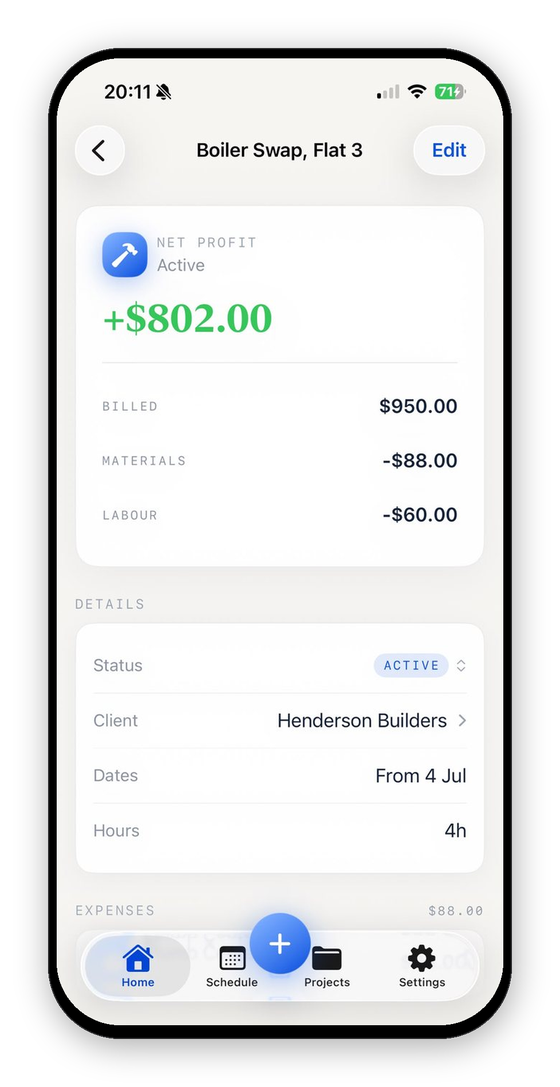
- You want to know what each job made without paying for a $199 plan to see it. Receipts, mileage and hours land on the job, and the profit updates as you go.
- You work from an iPhone. Everything happens in the app, including the AI estimate from a photo or voice note, the invoice PDF and the pay link.
Other options worth a look
If you want something even simpler, Joist starts cheaper for estimates and invoices. If you need dispatch but find Jobber's jumps between plans steep, compare Housecall Pro. And if you only ever need the occasional invoice, the free invoice generator and trade templates may be all you need.
For how the AI drafting compares with typing an estimate by hand, see AI estimating for contractors.
What did that job really make?Profit and margin for any job in seconds.FAQ
Is there a cheaper alternative to Jobber?
For solo trades that don't need dispatch, yes. Apps focused on estimates, invoices and payments usually cost a fraction of Jobber's plans. What you give up is scheduling, the client hub and team features.
Does Jobber have job costing?
Jobber lists job costing with profitability tracking on its Grow plan and above, as of September 2026.
Can I move my clients from Jobber?
Most apps, VanReceipts included, let you add clients as you go or from your phone's contacts. Export your client list from Jobber first, so you have it either way.