In short
Keep the bookkeeping software for the tax return and put job costing alongside it. It organizes costs by category because that is what a tax return needs. A pricing decision needs them organized by job, and no amount of tidying the first gets you the second.
In this guide
If you are self-employed in the trades, someone has probably told you to "get your books on software." Fair enough: taxes are easier with tidy records. But there is a gap in that advice that costs tradespeople real money. Bookkeeping software is built to answer the IRS's question, how much did the business make. It is not built to answer yours, which is: did that job make money.
What Bookkeeping Software Does
Bookkeeping software, QuickBooks, Xero, Wave, FreshBooks, and the rest, does a few things genuinely well for a one-person business:
- Records income and expenses in tax categories, so your Schedule C figures assemble themselves.
- Connects to your bank, pulling transactions in automatically so less slips through (on most plans; Wave's free Starter plan does not auto-import bank transactions).
- Handles invoicing, so you can bill and see who has not paid (some entry plans cap it: Xero Early allows 20 invoices a month, FreshBooks Lite 5 clients).
- Keeps a digital paper trail, which is what you want if a deduction is ever questioned.
If you are still on a shoebox of receipts and an April panic, any of these tools is a real upgrade. That advice stands.
What they cost, at list price on each company's own pricing page (prices checked October 2026; most run a discount for the first months):
| Software | Entry plan | Plan with project or job tracking |
|---|---|---|
| QuickBooks Online | Simple Start $38/mo (a Free plan sends 2 invoices a month) | Plus $140/mo, "Track project profitability" |
| Xero | Early $27/mo (20 invoices a month) | Growing $59/mo, "Track time and costs for projects" |
| FreshBooks | Lite $23/mo (5 clients) | Premium $70/mo, "Check project profitability" |
| Wave | Starter, free (no bank connections) | Not offered; Pro $19/mo adds bank import |
The Gap: Bookkeeping Is by Tax Category, Not by Job
Here is what none of them do well for a one-person trade business, even on the plans that track projects. Bookkeeping software organizes your money by type: materials, fuel, insurance, phone. That is exactly what a tax return needs. But it means your $4,000 of materials this quarter is one number, with no answer to the question that runs your business: how much of it belonged to the kitchen remodel, and did the kitchen remodel make money once your hours went in?
That per-job view is called job costing, and it is a different way of slicing the same costs: by job instead of by category. You need both slices. The category slice pays the IRS. The job slice tells you which work is worth doing and what to quote next time.
Project tracking exists on the higher plans in the table above, but every cost still has to be assigned to the project by hand, usually later at a desk, so the job view is only as complete as that habit.
Bookkeeping tells you the business made $38,000 last year. Job costing tells you the bathroom remodels carried the year and the emergency service calls barely broke even. Only one of those changes how you price your next quote.
What Tradespeople Need Beyond Bookkeeping
For a self-employed tradesperson, the practical stack is smaller than the software industry makes it look:
| Need | What handles it |
|---|---|
| Schedule C records, invoicing, bank feed | Bookkeeping software (QuickBooks, Xero, Wave, FreshBooks) |
| Profit per job, receipt capture in the van | A job costing app (VanReceipts) |
| Quoting sanity-check | A job profit calculator |
| Materials-vs-labor split for 1099 work | Your bookkeeping software plus clean per-job records |
The second row is the one most people are missing. Costs happen in a supply house parking lot at 8am; bookkeeping happens at a laptop, later, by category. The receipt-first method closes that gap: scan each receipt the moment you get it, tag it to the job, and per-job profit keeps itself. The full method is in how to track job costs from receipts.
How VanReceipts Complements QuickBooks, Xero, and Wave
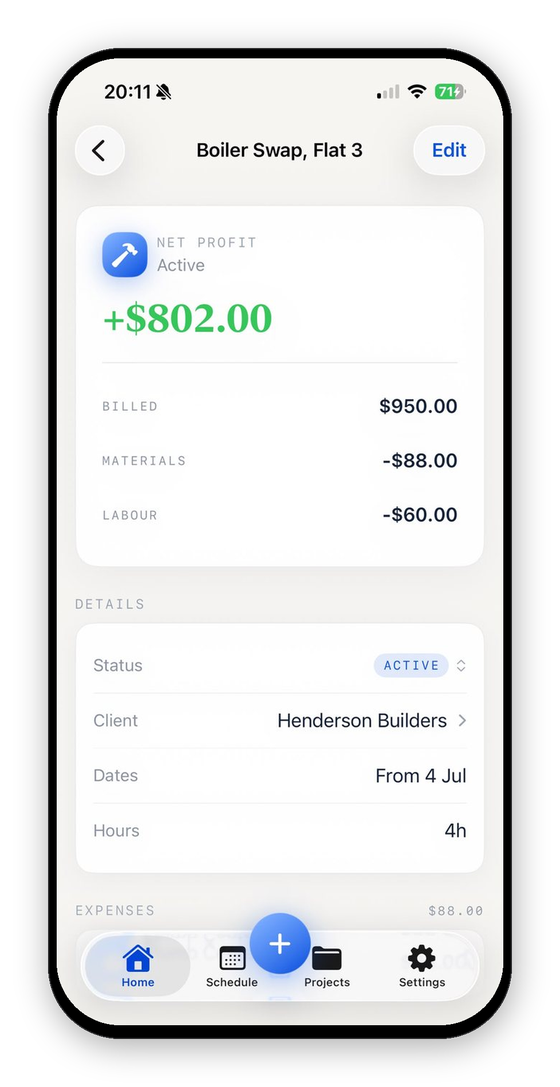
VanReceipts is not full bookkeeping software, and it does not try to be. It is the job money layer that sits alongside QuickBooks, Xero, or Wave when you still need a bank feed and a clean set of year-end numbers. In the van you send estimates and invoices, scan receipts (with Pro, cloud AI reads the whole receipt, every line included), pick the job each cost belongs to, log mileage and hours, and keep live profit per job. It does not connect to QuickBooks, Xero or Wave, and it has no bank feed: the hand-off is a CSV or Excel export, or a period export from Accounting with income and expense files, a net profit summary and a mileage file. It is an iPhone app. Free to make and send invoices and estimates. Pro is $14.99 a month or $99.99 a year (3-day free trial on the yearly plan) and adds AI estimates, every template, quote and pay links, payments, receipts, mileage and job profit.
Your bookkeeping software keeps doing what it is good at: the bank feed, the tax categories, the year-end return. VanReceipts answers the question bookkeeping cannot, what each job made you, and gives you a clean, dated, categorized record of every receipt as a bonus. Complement, not compete. If QuickBooks specifically is your tool, we have a closer look at what QuickBooks can and cannot do for job costing.
What This Does at Tax Time
- Deductions. Every cost you capture for job costing is also a deductible business expense. Capture receipts as you go and your expense figures are ready when the return is due, instead of being reconstructed from a faded pile in the door pocket.
- Substantiation. A dated, itemized, categorized receipt record is the thing you want to already have if a deduction is ever questioned. Job costing produces it as a side effect.
- Contract labor. If you pay helpers as 1099 contractors, keeping materials and labor separated per job means the year-end split is already done.
Choosing Your Setup
Keep it simple:
- Pick one bookkeeping tool and actually use it. QuickBooks, Xero, Wave, and FreshBooks are all capable for a one-person business. The best one is the one you will keep up with.
- Add the job layer. Scan every receipt to the job it belongs to as you work: scan, check the read, pick the job, confirm. That is the core of VanReceipts, and it takes seconds from the van seat.
- Put a rate on your own time and log your hours per job. Without that, every job looks profitable on paper. The complete guide to job costing explains why.
That is the entire stack. One tool for the IRS, one for your margins, and your own hourly rate taken seriously.
What did that job really make?Profit and margin for any job in seconds.FAQ
What is the best bookkeeping software for a self-employed tradesperson?
QuickBooks, Xero, Wave, and FreshBooks are all capable for a one-person trade business, from free (Wave Starter) to $38 a month (QuickBooks Simple Start) at entry level. The honest answer is that the bookkeeping tool matters less than pairing it with per-job cost tracking, which their project features only give you on higher plans and with manual tagging.
Does bookkeeping software do job costing?
Some plans do: QuickBooks Online Plus ($140/mo), Xero Growing ($59/mo) and FreshBooks Premium ($70/mo) track project profitability. But the core of bookkeeping software is costs by tax category, and getting each cost onto a project is manual work after the fact, which is where it breaks for a small trade business. A job costing app fills that gap alongside it.
Do I need bookkeeping software AND a job costing app?
They answer different questions, so many tradespeople end up with both. Bookkeeping software handles your Schedule C, invoicing, and the bank feed. A job costing app like VanReceipts captures receipts in the van and shows profit per job. Neither replaces the other.
Can I just use a spreadsheet instead?
You can, and plenty of people start there. A spreadsheet only holds what you remember to type in, and it lives on a laptop at home while the costs happen at a supply house counter. That gap is where the missing costs live. Our job costing spreadsheet template is a fine starting point if you want to try the manual version first.
Download VanReceipts on the App Store and see what each job actually makes you, alongside whatever bookkeeping tool you already use.